01
New dropshipping SKUs
Use the flat product images supplied with a new collection instead of waiting to arrange a separate on-model shoot for every item.
Use the supplier photo you already have
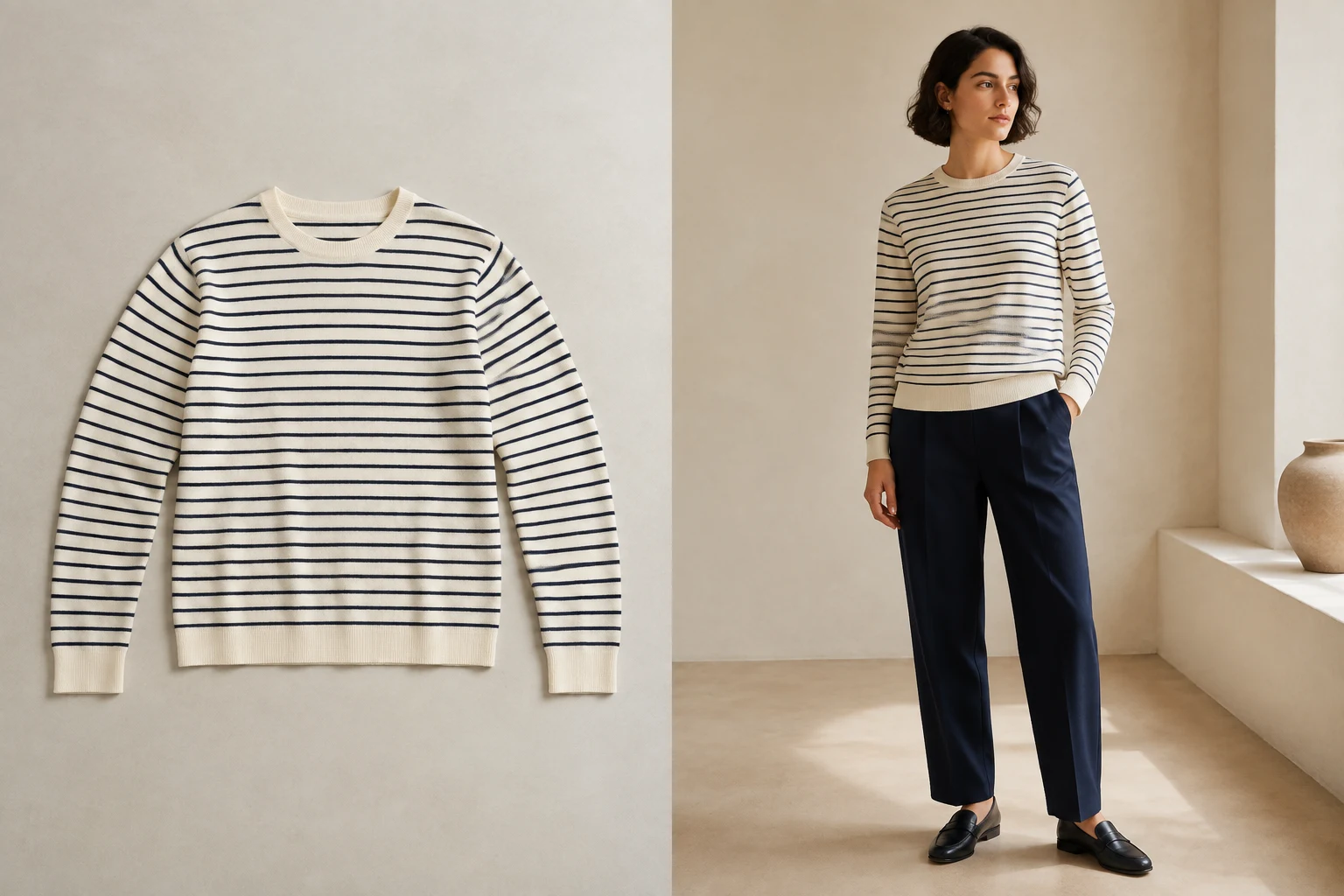
Flat lay to model conversion lets you put clothes on an AI model using the product photo you already have. Choose from 24 adult AI models, set the photo direction, and compare the result with the original garment.
30 shared lifetime credits · product and model creation share one balance
 Open full-size illustration
From overhead product photo to model image
A centered flat lay with a visible neckline, sleeves, print, and hem gives the workflow clear product information to carry into the finished image.
Built for real listing work
01
Use the flat product images supplied with a new collection instead of waiting to arrange a separate on-model shoot for every item.
02
Replace a mix of unrelated source styles with model images that share the same adult storefront model and download format.
03
Create one finished model image, check it against the garment, and test whether on-model context improves the product presentation.
Upload a centered flat lay
Choose a storefront model
Set the photo size, create and download
01
Center the garment, show the complete neckline and hem, spread sleeves naturally, and remove objects that cover the product. Even lighting and a simple background make the source easier to interpret.
02
After flat lay to model generation, compare color, print, logo, neckline, sleeves, seams, fasteners, length, and proportions with the source photo. AI can make mistakes, so the real garment remains the final reference.
03
Deep folds, crossed sleeves, cropped hems, heavy shadows, low resolution, or props covering the garment can hide the information needed for a reliable result. Retake or clean the source before spending credits when key construction details are unclear.
04
Choose a portrait, square or landscape aspect ratio and 1K or 2K resolution before generating. Select JPG for a compact file or PNG for lossless encoding. Download each finished original, or select several photos to collect them in a ZIP.
What you receive
Choose the photo shape, resolution and format before generating. Review the finished image against the real garment before publishing.
Every plan downloads the original generated file.
Images we cannot create are not charged.
Private files are retained for up to 90 days unless deleted earlier.
No. Suitability depends on the source and garment details. Fine lettering, intricate patterns, occlusion and unusual construction require particular care. Review each output against the actual product rather than assuming support means guaranteed accuracy.
One finished image uses 10 credits. If we can’t create the image, you aren’t charged.
Use a simple, evenly lit background that contrasts with the garment. White or neutral surfaces usually make the product boundary easier to read.
Show the natural silhouette whenever possible. Avoid folds that hide sleeve length, garment length, pockets, prints, or other details a shopper needs to inspect.
Yes. Free users choose the aspect ratio and resolution before generating and download the original generated file.
Yes. Select the same built-in adult model during each creation. You can also create your own reusable AI model on any signed-in plan.
Create your next listing image
Use a centered garment photo with the full silhouette visible, choose an adult model, and download the finished image for your marketplace.
Create from a flat lay