01
Differentiate a shared supplier image
Replace the adult model in a photo you may use so your listing does not present the exact same person as every competing seller.
Keep the clothing. Replace the model.
Use AI model swap when the source already shows someone wearing your product. Choose the replacement person, then check the clothing and composition against the authorized source. This is a clothing workflow, not a general face-swap tool.
Starter or higher · authorized adult source photos only
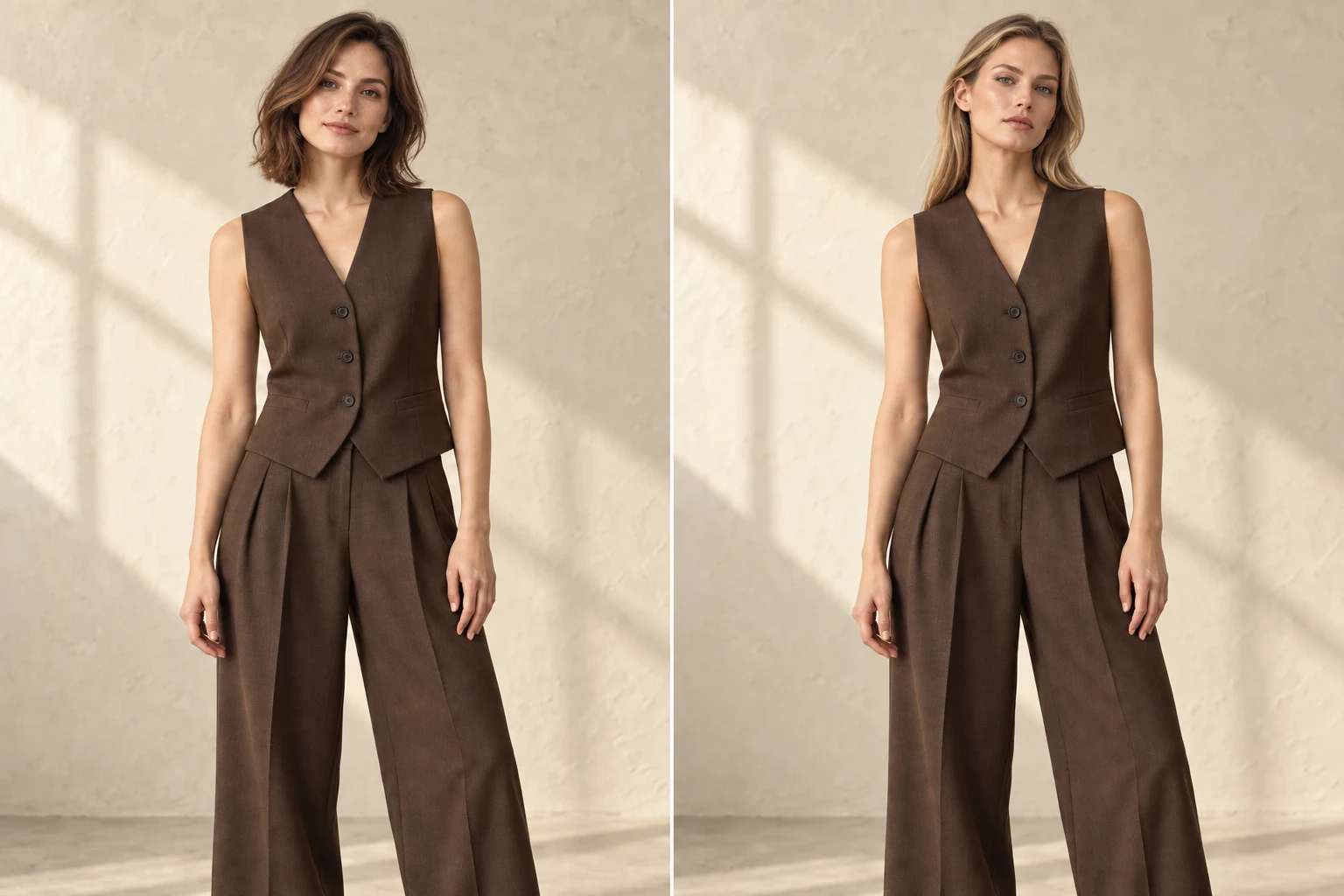 Open full-size illustration
Change the person, not the product story
The target is a replacement adult model with the same clothing, pose, framing, lighting, and setting—not a new campaign concept and never a copy of the source person’s identity.
Built for real listing work
01
Replace the adult model in a photo you may use so your listing does not present the exact same person as every competing seller.
02
Choose a built-in adult model—or your own AI model—while retaining the useful pose, crop, lighting, and background.
03
Keep an authorized photograph that already presents the garment well instead of rebuilding the pose and scene from a product-only source.
Upload an adult supplier-model photo you may use
Choose the replacement model
Check the clothing, pose, and background before downloading
01
Model swap AI is intended to replace the person while preserving the visible clothing, pose, camera angle, crop, lighting, and setting. It does not copy the identity or face of the person in the source image.
02
Compare the finished image with the authorized source before publishing. Check the garment construction, body position, framing, background, and any product details that a shopper will use to judge the item.
03
You must own or have permission to use the source photograph and confirm that the depicted person is an adult. The workflow does not accept minors, celebrity likeness requests, unlicensed material, or instructions to copy a real person’s identity.
04
Use Model Swap only when the source already contains an adult person whose pose and scene you want to retain. If your source is a flat lay, ghost mannequin, hanger, or clean product-only photo, use the main Create product image workflow instead.
What you receive
Choose the photo shape, resolution and format before generating. Review the finished image against the real garment before publishing.
Every plan downloads the original generated file.
Images we cannot create are not charged.
Private files are retained for up to 90 days unless deleted earlier.
No. It replaces the person in the source photo with an adult AI model. Celebrity likenesses, minors, and unlicensed source images are prohibited.
The clothing, pose, framing, and background should remain recognizable. AI can still make mistakes, so compare the finished image with the source before publishing.
Model Swap is available from Starter. All signed-in plans can create reusable AI models.
No. Upload only a photograph you own or have permission to use, depicting an adult. You must confirm those rights before creation.
No. Celebrity imitation and real-person identity copying are prohibited. Choose an adult AI model supplied by the product or an eligible private storefront model.
Use Create product image instead. Model Swap is specifically for authorized source photographs that already show an adult model.
Create your next listing image
Try model swap AI with an authorized photo, then compare clothing, pose, crop, lighting and background with the source before publishing it in your store.
Open Model Swap