01
Boutique catalog updates
Turn a shaped dress, top, or hoodie source into an on-model image when a physical model shoot is outside the launch budget.
Show the garment on a model
Start with the ghost mannequin photography you already have. Choose a model for your storefront, create one listing image, and compare every visible garment detail before downloading.
3 free original images after Google sign-in · no card
 Open full-size illustration
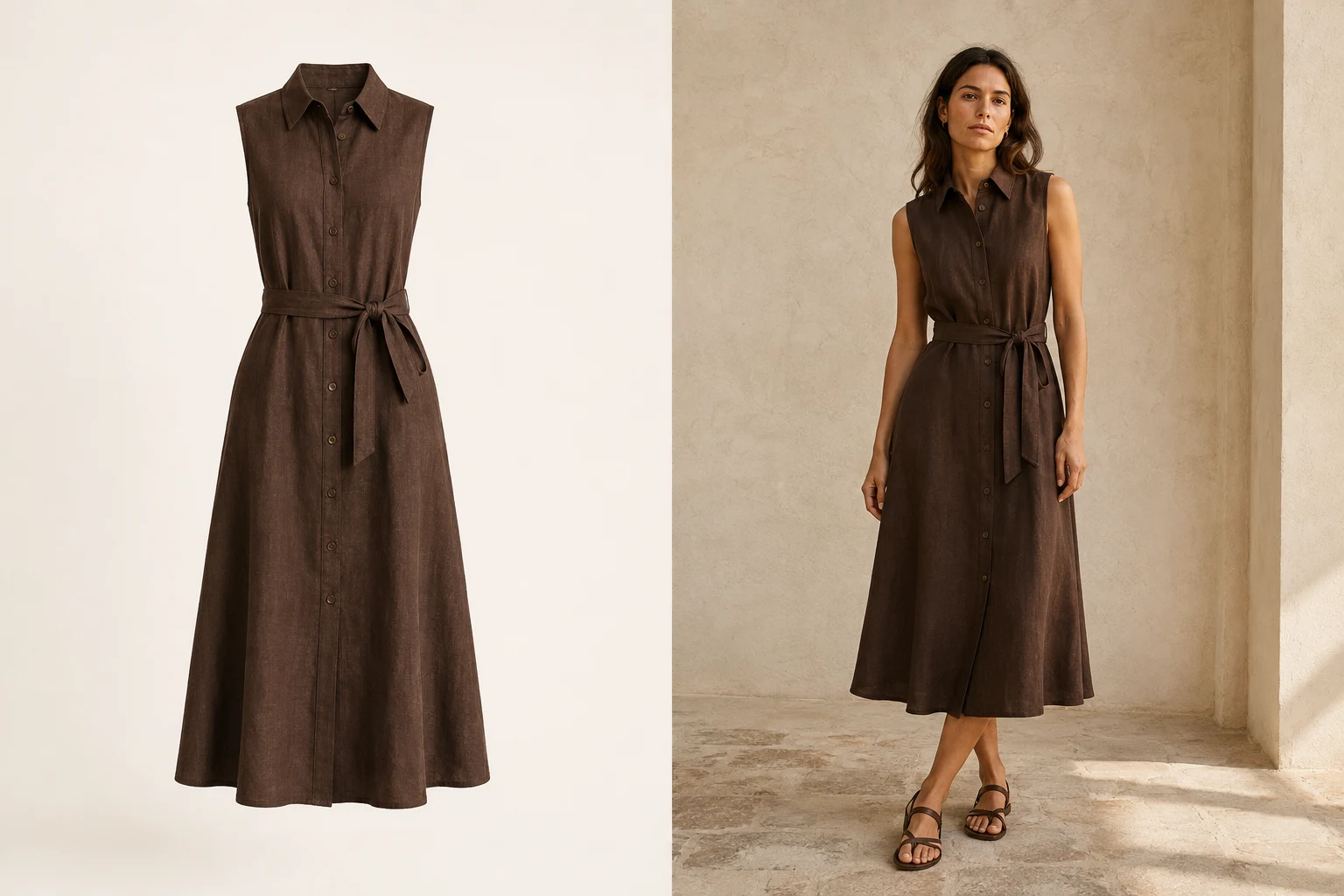
From shaped product photo to model image
A ghost-mannequin source can show the neckline, waist, fasteners, print, and length clearly. The goal is to carry those visible details into an adult on-model listing image.
Built for real listing work
01
Turn a shaped dress, top, or hoodie source into an on-model image when a physical model shoot is outside the launch budget.
02
Start from the clean garment asset a supplier provides, then choose a storefront model that does not look like every competing listing.
03
Use the same adult model across related products so new SKUs feel like part of one planned catalog.
Upload a clean ghost mannequin photo
Choose a storefront model
Set your photo size, create and check the garment
01
Ghost mannequins show useful product structure without a visible person. Keep the full garment in frame so the AI workflow can read the neckline, sleeves, waist, hem, and fasteners before placing it on your chosen adult model.
02
A clean source image can become the starting point for a model listing image, so you do not need to re-photograph the SKU simply to show it on a person. Always compare the result with the original product before publishing.
03
Review the collar or neckline, sleeve shape, shoulder position, waist, button or zip placement, pockets, print, and hem. AI can still introduce errors, so the original ghost-mannequin image and real garment remain the source of truth.
04
Choose the aspect ratio, 1K or 2K resolution, and JPG or PNG format before creating. Download the original file when it is ready on any plan.
What you receive
Choose the photo shape, resolution and format before generating. Review the finished image against the real garment before publishing.
Every plan downloads the original generated file.
Images we cannot create are not charged.
Private files are retained for up to 90 days unless deleted earlier.
ModelSnap is designed to keep visible details such as the neckline, sleeves, length, closures, and print in focus. AI can still make mistakes, so compare every image with the real product before publishing.
No. The current product creates adult model imagery and does not support children or childrenswear.
Use a sharp, evenly lit image with the full garment visible, a simple background, and no props or overlays covering important product details.
A clean finished ghost-mannequin image is the best source. Remove visible stand parts and obvious retouching artifacts before upload when possible.
One finished product image uses 10 credits. If the image cannot be created, you are not charged for it.
Choose 1K or 2K resolution and JPG or PNG format before generating. Download the finished image at its original size.
Create your next listing image
Upload one clean mannequin product photo, choose an adult model, and review the garment after choosing the photo shape and resolution.
Create a model image